


How PvX Delta works: a five-stage nightly audit — validity gate, account trends, dimension slicing, creative pass, prioritization — explained step by step.
Oct 19, 2026 - 7 minutes
Here is how PvX Delta works, in one paragraph. Every night it reads your MMP (AppsFlyer, Adjust or Singular) together with your Meta Ads and Google Ads accounts through their official, read-only APIs. It runs the same five-stage audit an experienced UA lead would run if they had the time: gate out unreadable data, read the account-level trends, slice them by OS, geo, network, campaign, ad set and audience, run a creative pass, then rank and deduplicate what it found. The output is a short decision brief waiting for you in the morning. There are no prompts to write and no dashboards to build. Delta is advisory by design: it tells you what to change and why, and you make the change.
In this guide: The five stages · Stage 0: validity gate · Stage 1: account trends · Stage 2: slicing · Stage 3: creative · Stage 4: prioritization · What Delta doesn't do
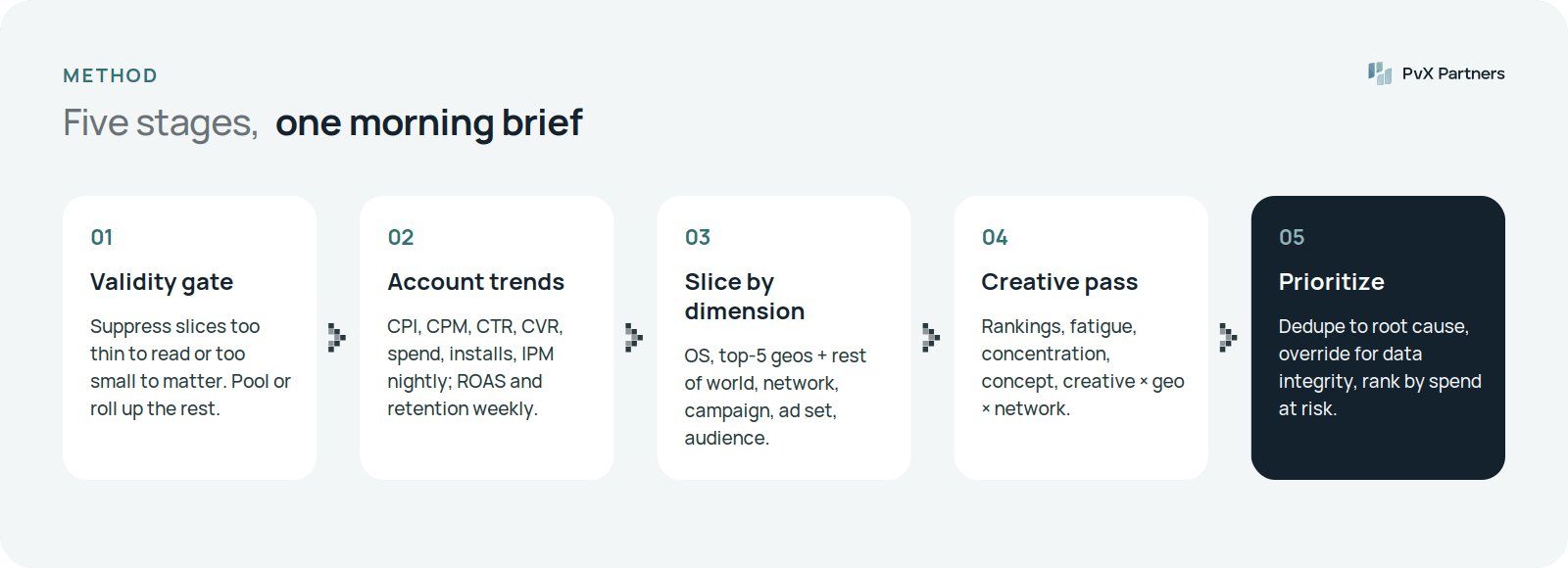
The order matters. Each stage narrows what the next one has to look at, and the gate at the front keeps noise from reaching the brief at all. This is the same structure as our mobile UA audit checklist, which lists every check by stage; the PvX Delta check library describes each check family.
Two data rules run through every stage:
Delta joins the two on campaign, date, country and OS. That join is what lets it say "CPI is up on this network in this country, and the extra cost isn't buying better users," rather than just "CPI is up."
Data syncs once a day, so Delta is a nightly audit, not an hourly alert system. Its cohort-based checks need days of maturity anyway; the delivery checks are the ones that benefit most from running every night instead of once a week.
Before any check runs, every slice of the account goes through a gate. Two questions:
Slices that fail are pooled over more days or rolled up to the next level — ad set into campaign, campaign into network or geo tier — until they clear. They aren't dropped, because dropping hides real problems, and they aren't read raw, because that invents fake ones.
In an illustrative run from our spec's sample results, 412 slices were evaluated and 37 were suppressed. One was a tier-2 Android campaign on an ad network that spent $38 a day, 1.7% of its parent's spend. It had valid volume but failed materiality. The background is in minimum sample size for UA decisions.
Stage 1 reads the account as a whole, every night: CPI, CPM, CTR, CVR, spend, impressions, installs and IPM daily; D1–D30 ROAS and D1–D14 retention weekly. Each metric is compared with its own baseline — the recent window against a longer prior window — and judged against that metric's normal variance, so a one-day wobble doesn't get flagged.
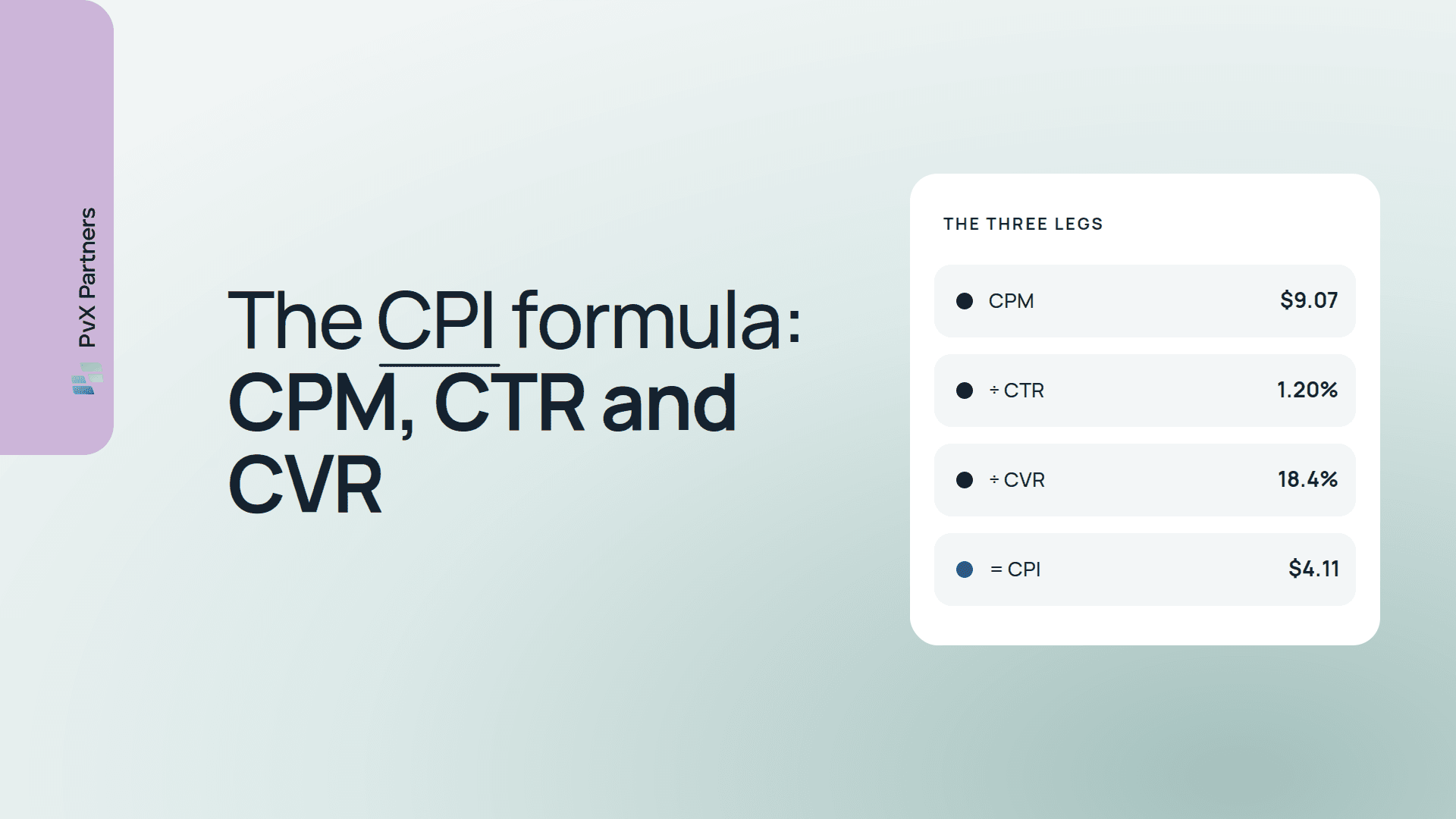
An account-level move is a symptom, not a diagnosis. When CPI rises, Stage 1 decomposes it into the three legs that can move it (CPM, CTR and CVR) and checks whether the rise is a real rate change or spend drifting toward pricier segments. It then hands the leg that moved to Stage 2 to find out where. Why is my CPI increasing? walks through that decomposition.
Stage 2 runs the same metric families down every dimension the data supports:
The dimension that isolates a move usually names its cause. A CPI rise on every network in one country points at the local market or a localization problem. A rise on one network in every country points at that network's auction. In the illustrative example above, one ad network's CPM jumped 31% starting the day it pushed a bidder update, while Korea's CPM rose 22% on both Meta and TikTok at once. Two separate causes, both hidden inside one account-level number.
The creative pass runs at ad level, mostly weekly, with creative fatigue checked daily:
This is the stage people skip most often, because it's the most tedious. Read more in creative fatigue detection.
Left alone, the stages above would bury you. One root cause fires at several depths at once — a single network's CPM spike trips aggregate, OS, geo and campaign checks on the same night. Stage 4 turns flags into findings:
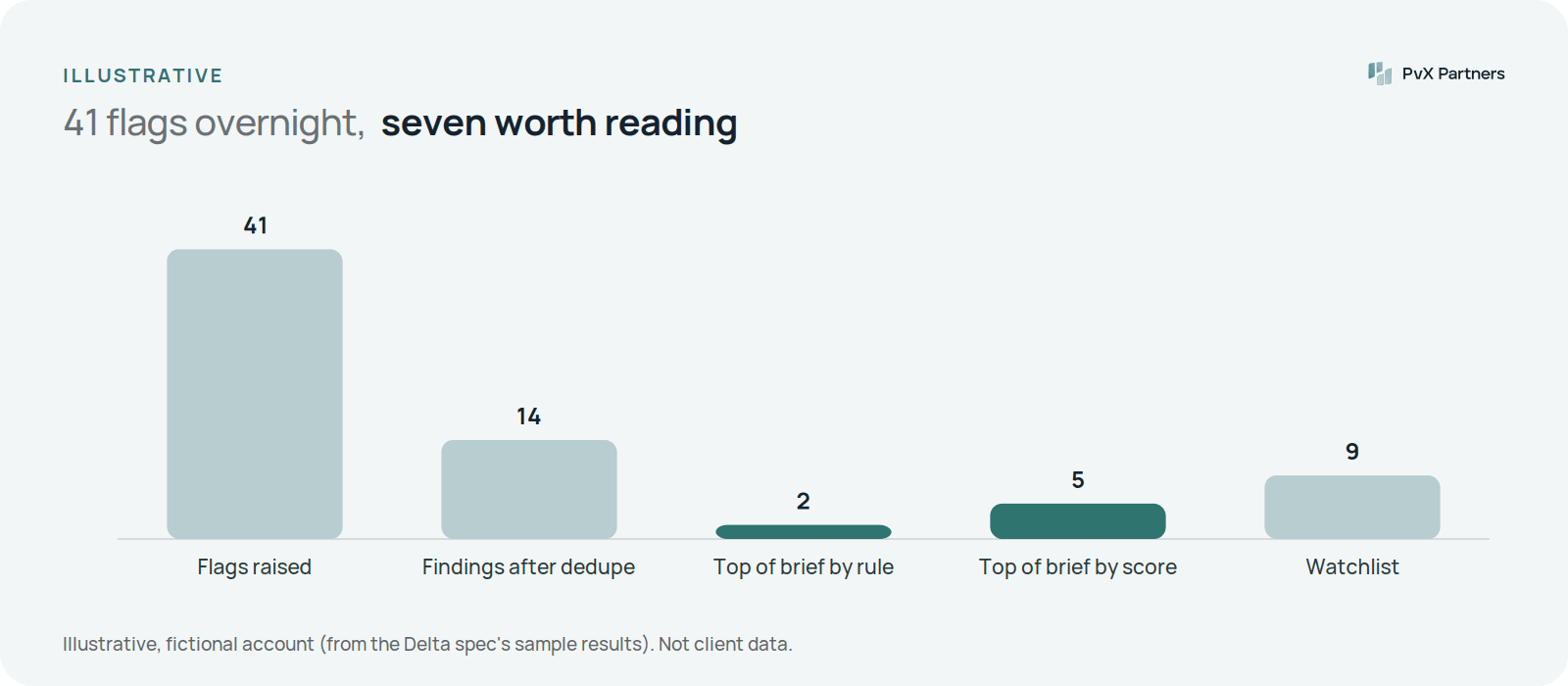
Each finding in the brief names the slice, the metric that moved, the likely cause and the recommended action — rebid, re-budget, shift mix, refresh creative, change targeting, or wait for more data.
Being clear about this saves you a sales call:
The comparison with other approaches is in what is an AI agent for user acquisition? and, from the category side, what is an autonomous UA audit?.
Setup is a data connection, not a project: you grant read-only access to your MMP and ad accounts through their official APIs, and the first brief arrives after the first nightly run. The exact permissions requested are listed in connecting your data to PvX Delta. PvX Delta is free.
Wake up to the decision, not the dashboards.
Free, read-only, official APIs.
Oct 16, 2026 - 10 minutes
Oct 16, 2026 - 15 minutes

Oct 15, 2026 - 15 minutes
Some of the fastest growing businesses in the industry