


AppsFlyer data analysis automation with PvX Delta: what it reads from AppsFlyer, what it joins from Meta and Google, and the checks that need both. Free.
Oct 19, 2026 - 6 minutes

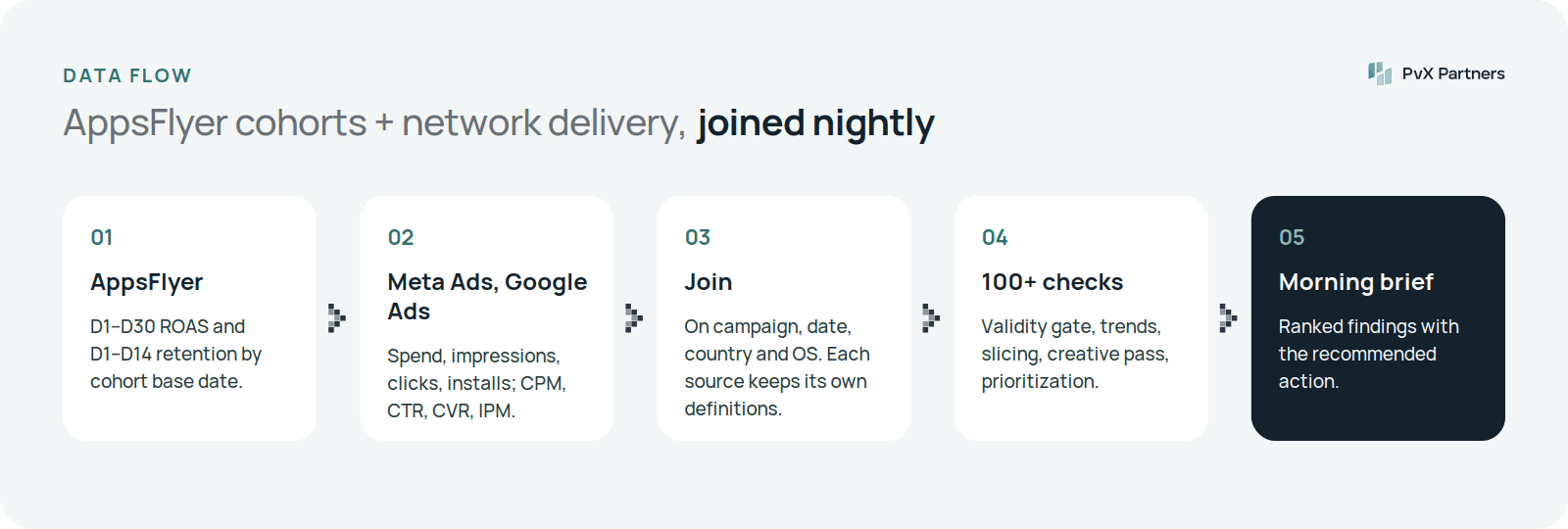
PvX Delta automates AppsFlyer data analysis by reading your AppsFlyer cohorts every night and joining them to your Meta Ads and Google Ads delivery data. From AppsFlyer it takes D1–D30 ROAS and D1–D14 retention, by cohort base date. From the ad networks it takes spend, impressions, clicks, installs, CPM, CTR and CVR. With both in one context, it runs 100+ deterministic checks across OS, geo, network, campaign, ad set, audience and creative, and leaves a decision brief for the morning. Access is read-only through official APIs, and Delta is free. It doesn't change your campaigns or your AppsFlyer configuration.
That's the whole list. Delta doesn't need raw user-level data for these checks, and it doesn't write anything back to AppsFlyer.
From each ad network, through its official API, Delta reads the delivery view: spend, impressions, clicks and network-reported installs, plus the CPM, CTR, CVR and IPM derived from them. It also reads the structure — campaigns, ad sets or ad groups, and ads — so a cohort finding can be traced to the entity you'd actually change.
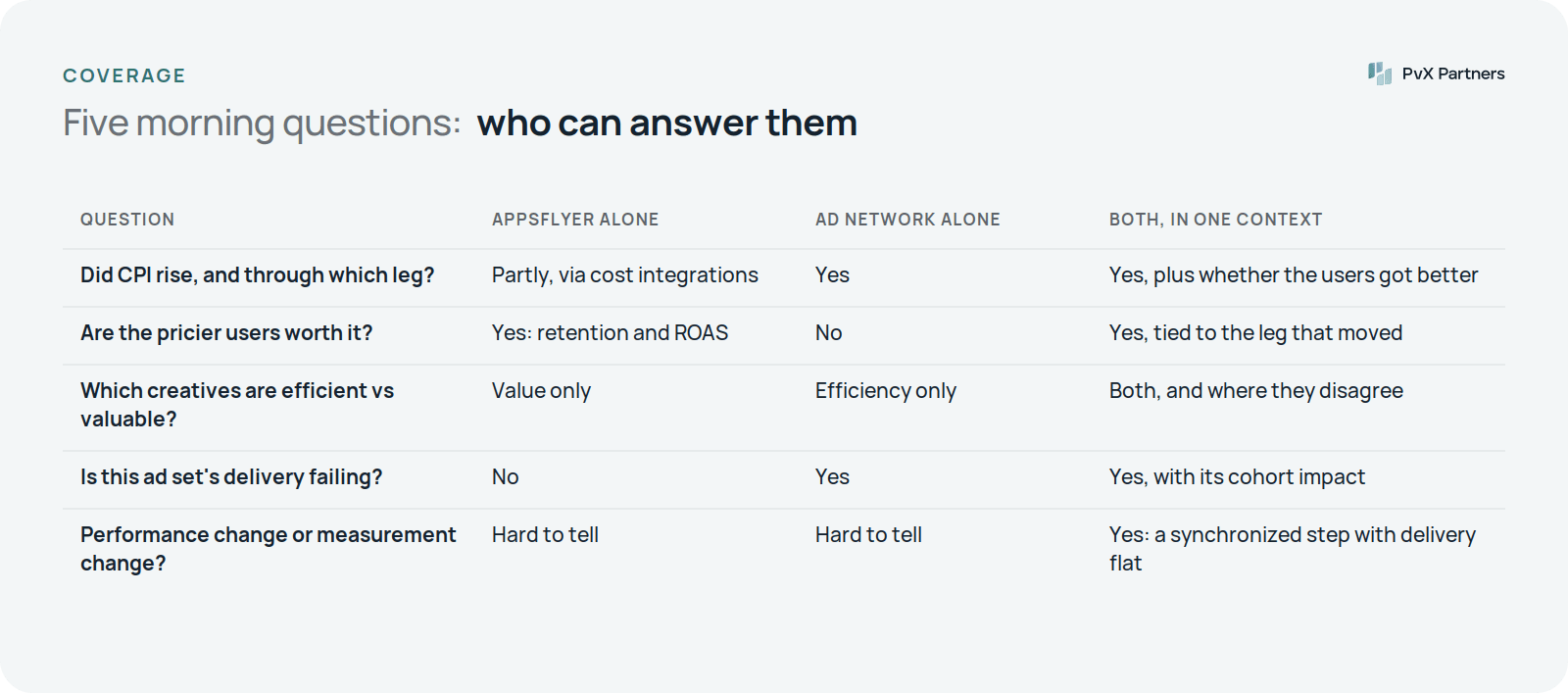
Why not just use the cost data inside AppsFlyer? For ROAS, AppsFlyer's cost integrations are often enough. But the questions UA teams ask every morning are about delivery: is CPM rising in this ad set, is this creative's CTR decaying, did installs fall on the network side or only in attribution? Those live in the network's own reporting, measured the network's way. Delta keeps both views, and never mixes their definitions.
CPI comes from the network side; whether the extra cost bought better users comes from AppsFlyer. When CPI rises, Delta decomposes it into CPM, CTR and CVR legs. It then reads D1 retention and early ROAS of the same cohorts. In one illustrative example from our spec's samples, CPI was up 18% but D1 retention of the pricier cohorts was flat at about 39%. The account was paying more for the same users, which made it a real cost problem. If retention and ROAS had risen with CPI, the same CPI flag would have been reported as a win, not a threat. See why is my CPI increasing?
The network tells you which creatives are efficient: IPM, CTR, CPI. AppsFlyer tells you which ones bring users who pay: D7 retention and Dx ROAS. Delta ranks creatives both ways, weekly, and the disagreement is where the insight is. A creative at the top of the IPM ranking and the bottom of the ROAS ranking is buying cheap, low-value installs. A creative that is mid-table on IPM but leads on ROAS deserves more budget than its spend share suggests. Per-creative ROAS is noisy, so thin cohorts and single-whale cohorts are screened out first. See top and worst creative ranking.
When cohort ROAS drops, the first question is whether users changed or the measurement did. Delta checks whether a decline is synchronized — the same step change across every campaign and network on one date — and whether the delivery side moved at all. In an illustrative spec sample, iOS D7 ROAS fell from 38.1% to 33.2% in one week, across every iOS campaign at once. Network CPI was flat. Revenue per install dropped in a single step on the date the MMP's SKAN revenue-modeling setting changed. Verdict: a measurement artifact, so the brief said not to reallocate budget on it. See ROAS dropping? and the AppsFlyer vs Meta Ads Manager install discrepancy guide.
AppsFlyer has its own agents. Its Agent Hub (in beta at the time of writing) includes an agent that monitors KPIs daily for anomalies across partners, campaigns and geos, plus research and summary agents. If you're on AppsFlyer, use them. They're built on AppsFlyer's data, and only agents AppsFlyer develops are available in the hub.
Delta is different in three ways:
The two approaches overlap less than it looks; PvX Delta vs AppsFlyer Agent Hub compares them in detail.
If you also run Adjust or Singular for another app, Delta reads those the same way.
Get tomorrow's brief on your AppsFlyer data.
.png-j99mmp.png)
Oct 22, 2026 - 7 minutes
Oct 19, 2026 - 6 minutes
Oct 19, 2026 - 8 minutes
Some of the fastest growing businesses in the industry